The plan in plain English
Everyone is in the challenge. Nobody has to rely on a trainer: every message says to ask JFI in the app for help. The times are suggestions.
Push notification to everyone in the app
Goes to every phone with JF Coach notifications on. Tapping it opens the new-app welcome, then the setup form.
Email to website entrants who aren't on the app yet
Only people who entered through the Spring Kickstart landing page and haven't signed in to JF Coach. Anyone already on the app gets the push instead.
Your post in the global chat
Posted by you in the announcement-only room everyone is in. Clients can read it and react, not reply. Heads-up: the post also buzzes phones as "Message from Jamie", which is why it's two hours after the push.
Reminder emails, until they're set up
A short nudge to the same entrants on day 2, 3 and 5. Each morning the list is re-checked, and anyone who has finished setup drops off. This automation isn't built yet.
Automated message from each client's trainer
You dropped this on 30 Sep at 20:55. It's shown further down for the record.
Who gets what
| Person | Push 10:00 | Email + reminders | Chat post 12:00 |
|---|---|---|---|
| Client on the app, notifications on | Yes | No | Yes, and it buzzes their phone |
| Client on the app, notifications off | No. The welcome and setup appear the next time they open the app | No | Sees it when they open the app |
| Website entrant already on the app | Same as a client | No | Yes |
| Website entrant not on the app yet | No (no app yet) | Yes, until setup is done | Once they sign in |
| Trainers | Your call. The "all" audience includes 17 trainer phones; "clients" leaves them out | No | Yes. They're in the room |
Live numbers, read-only, 30 Sep about 21:00: 1,310 active clients. 253 people have a phone registered for JF Coach notifications (236 active clients and 17 trainers). So the push reaches roughly 1 in 5 clients. The rest see the welcome when they next open the app.
How nobody gets the same message twice
- Push: one send with a fixed send key. If the send is repeated by mistake, the server replays the first one instead of sending again.
- Email: only entrants with no JF Coach password yet. Anyone on the app gets the push instead, never both. The mail list sends once per email address. Trainers, staff and test accounts are left out.
- Chat post: posted once in the one room everyone is in. It pushes too, so it waits until 12:00 to space out the two buzzes.
- Reminders: the list is re-checked before each send. Anyone who has finished setup drops off.
- Trainer message: dropped, so there's no second welcome in each client's inbox.
What happens when they tap
- Push: opens JF Coach, which shows "Welcome to the new JF Coach", then the five-step setup (coach, goal, training, habits, injuries). Do Later is at the bottom of every step. Existing clients also see "Even if you've done this before, we recommend doing it again." Screens below.
- Email "Get started": goes to the App Store, with a Google Play link underneath. There's no one-tap personal sign-in link on 1 Oct: the app invite email has never carried one, and the /go invite links can't be made on live yet. After installing, they sign in with the email we have. The first time, they get a 6-digit code by email and choose a password. The same welcome and setup then appear.
- Chat post: the "Message from Jamie" buzz opens the global room.
Ava and "who's done it"
Your plan is to hook Ava up so you can ask who has and hasn't set up. That isn't connected yet. The data is there: the entrant list is in the mail system and HubSpot, and JF Coach knows who has a password and who has finished setup. The reminder emails would use the same check.
1. The push notification
To everyone in the app with notifications on. Suggested time: 10:00 Thursday.

Exact text
Fits without cutting. iPhone shows one line of title (about 35 characters before "…") and up to four lines of message. Android shows the title and one line when collapsed, so it reads "Your new JF Coach is here. Tap to set up…" until expanded. The server's own limits are 60 and 300 characters.
Check or decide
- Tone: is "Your new JF Coach is here" right for website entrants who have only had the app a few weeks?
- "(2 minutes)": the setup is five short steps plus a build. Two minutes is fair for a quick tapper. "A couple of minutes" is safer.
- Time: 10:00. It sends straight away, so press send when you mean it.
- Audience: "clients" (leaves out the 17 trainer phones) or "all"?
- Reach: only about 236 of 1,310 clients have notifications on. Everyone else sees the welcome the next time they open the app. The setup form asks them to turn notifications on.
- JFI's own pushes: if you switch JFI's daily pushes on tomorrow morning, its first plan push may land before this one. Keep them off until after 10:00, or accept two.
2. The email to entrants not on the app
Only website entrants with no JF Coach sign-in yet. Suggested time: 10:00 Thursday, then reminders on day 2, 3 and 5.
Exact text
The Spring Kickstart challenge starts today. Your free JF Coach app is ready with a program, a meal guide, habits and daily points.
[Get started] Two minutes to set up.
How to get in:
1. Download JF Coach.
2. Open it and sign in with this email: sam@example.com
3. First time? We'll email you a 6-digit code, then you choose a password.
Stuck? Reply to this email or ask JFI inside the app.
Jamie
Grey lines are my additions to your draft. The button can't sign anyone in, so they need the three steps, and a personal email needs a sign-off.
Check or decide
- Link target: store links for 1 Oct (nothing to build). Later, one "Get started" button could go to a small jamiefitness.au page that sends iPhones to the App Store and Android to Google Play. That page doesn't exist yet.
- Step 3 wording: the 6-digit code only happens if tonight's sign-in security update goes in as planned. If it doesn't, step 3 becomes "First time? You'll choose a password."
- Subject: 42 characters can lose its last word in the inbox on smaller iPhones. A shorter option: "Spring Kickstart has started" (28).
- Who's left out: anyone with a JF Coach password, trainers, staff, test accounts and unsubscribes. And the ~345 JF Mail people added to the app on 7 Sep who never entered through the landing page: leave them out, as the plan says?
- Replies: "Reply to this email" lands in support@. Who answers those on Thursday?
- Video: the 7 Sep plan had a video in the 1 Oct email. Add the 35-second reveal video as a link?
Hi Sam,
The Spring Kickstart challenge starts today. Your free JF Coach app is ready with a program, a meal guide, habits and daily points.
Get startedTwo minutes to set up. On Android? Get it on Google Play
- Download JF Coach.
- Sign in with this email: sam@example.com
- First time? We'll email you a 6-digit code, then you choose a password.
Stuck? Reply to this email or ask JFI inside the app.
Jamie
How it sits in the inbox list.
Reminders: day 2, 3 and 5
Hi Sam,
Your Spring plan is waiting. It takes two minutes.
Set it upOn Android? Get it on Google Play
Sign in with this email. First time? We'll email you a code.
Jamie
Exact text
Day 3, Sat: Two minutes to set up your Spring plan
Day 5, Mon: Last nudge: your Spring plan
Check or decide
- Cadence: your 30 Sep brain dump said "every day they don't set it up". The draft says day 2, 3 and 5, then stop. Which one?
- Stop rule: stop when they finish setup, or as soon as they sign in? Once they're in, the app shows the setup on every open anyway.
- Weekend: day 3 is a Saturday. Fine?
- Not built yet: this needs a small daily job on Factory, run as a dry run first (lists who it would email) before it goes live. It needs your go.
3. Your post in the global chat
Posted by you in the everyone room. It's announcement-only: clients read and react, they can't reply. Suggested time: 12:00 Thursday.
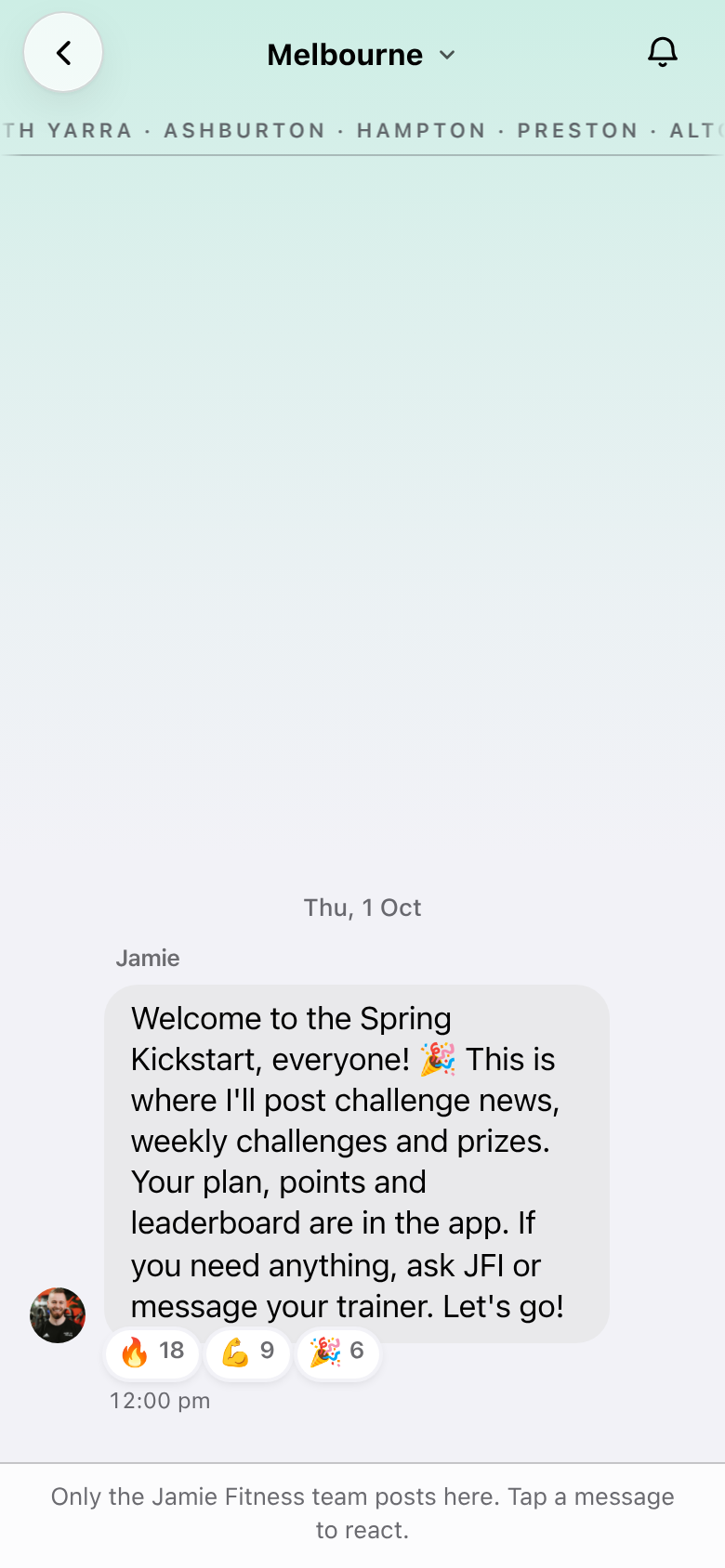
Exact text
Check or decide
- "or message your trainer": website entrants have no trainer, and the plan is no reliance on trainers. Suggested ending: "If you need anything, ask JFI in the app. Let's go!"
- The push cut: 229 characters means the buzz ends "…Your plan, points and lea". Keep the post under 140 characters, or accept the cut.
- Time: 12:00 spaces out the two buzzes. Posting at 10:00 with the push means two buzzes at once for about 250 phones.
- Room name: the room shows as "Melbourne", described as "Everyone training with Jamie Fitness in Melbourne". Sydney clients will see that too, and your Melbourne and Sydney rule applies everywhere else. Rename it before Thursday?
- Emoji: one 🎉 is within the style rule. Keep it?
Dropped: the automated message from each client's trainer
You dropped this on 30 Sep at 20:55. It would have gone in-app from each client's trainer to ongoing and Kickstart clients. It won't be sent.
Hey Sam, the Spring challenge starts today and the app has had a big upgrade. Take two minutes to do the new setup: it builds your Spring plan (program, meals, habits and goal). Even if you've done it before, it's worth doing again. Anything you're unsure about, ask JFI in the app, or message me here.
The "even if you've done it before" line isn't lost: the app's own welcome says it to existing clients (second screen below).
What they see after tapping
Real screens from the launch build, with sample data. The push opens straight into these. Email people see them once they've installed and signed in.
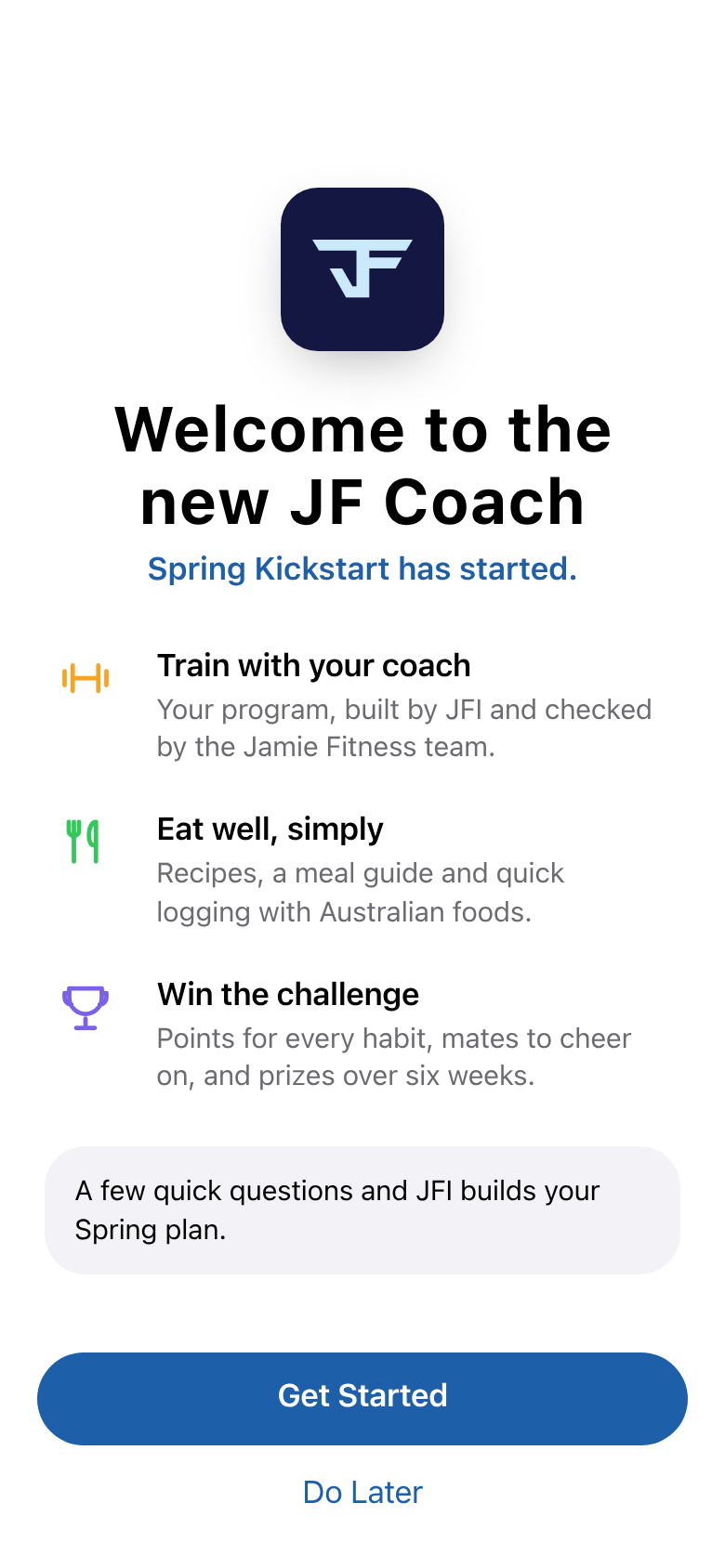
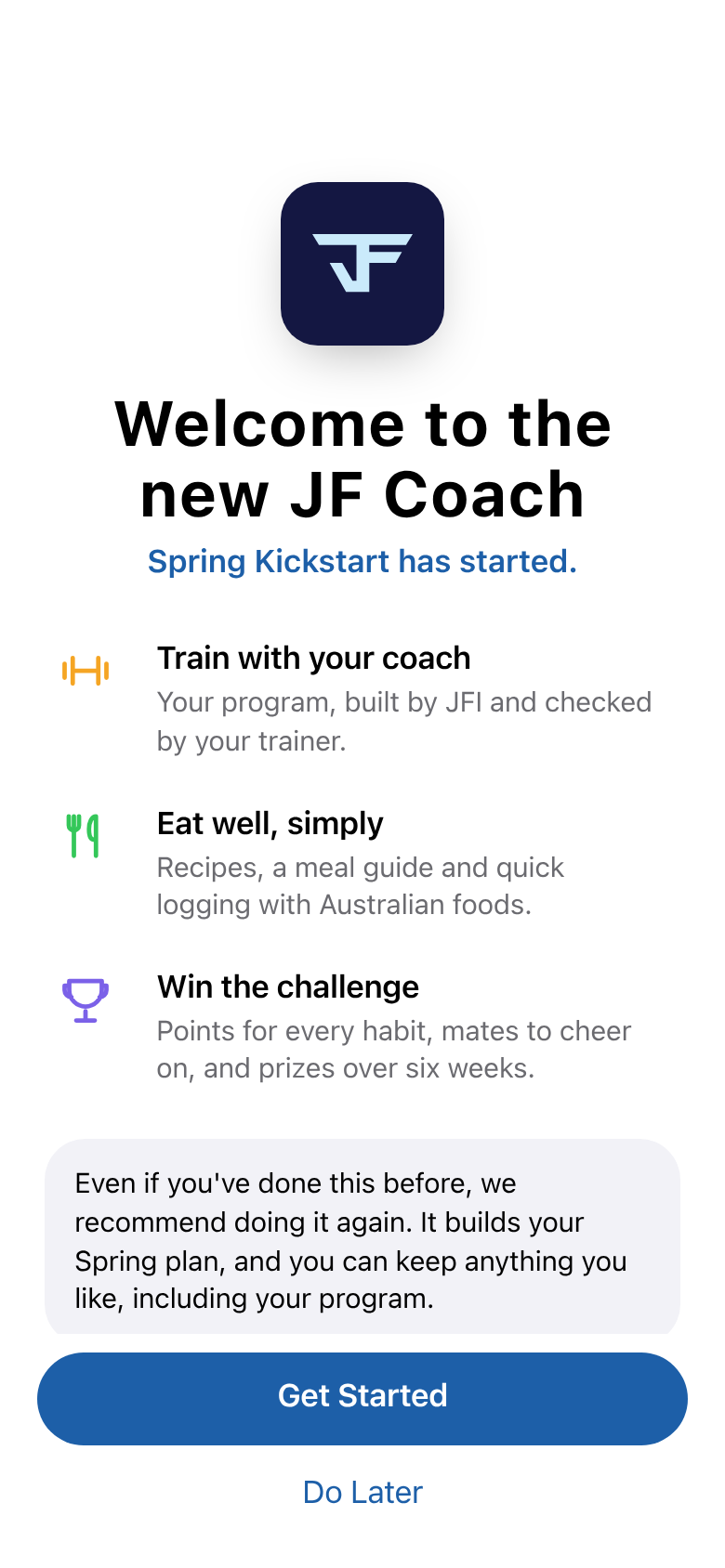
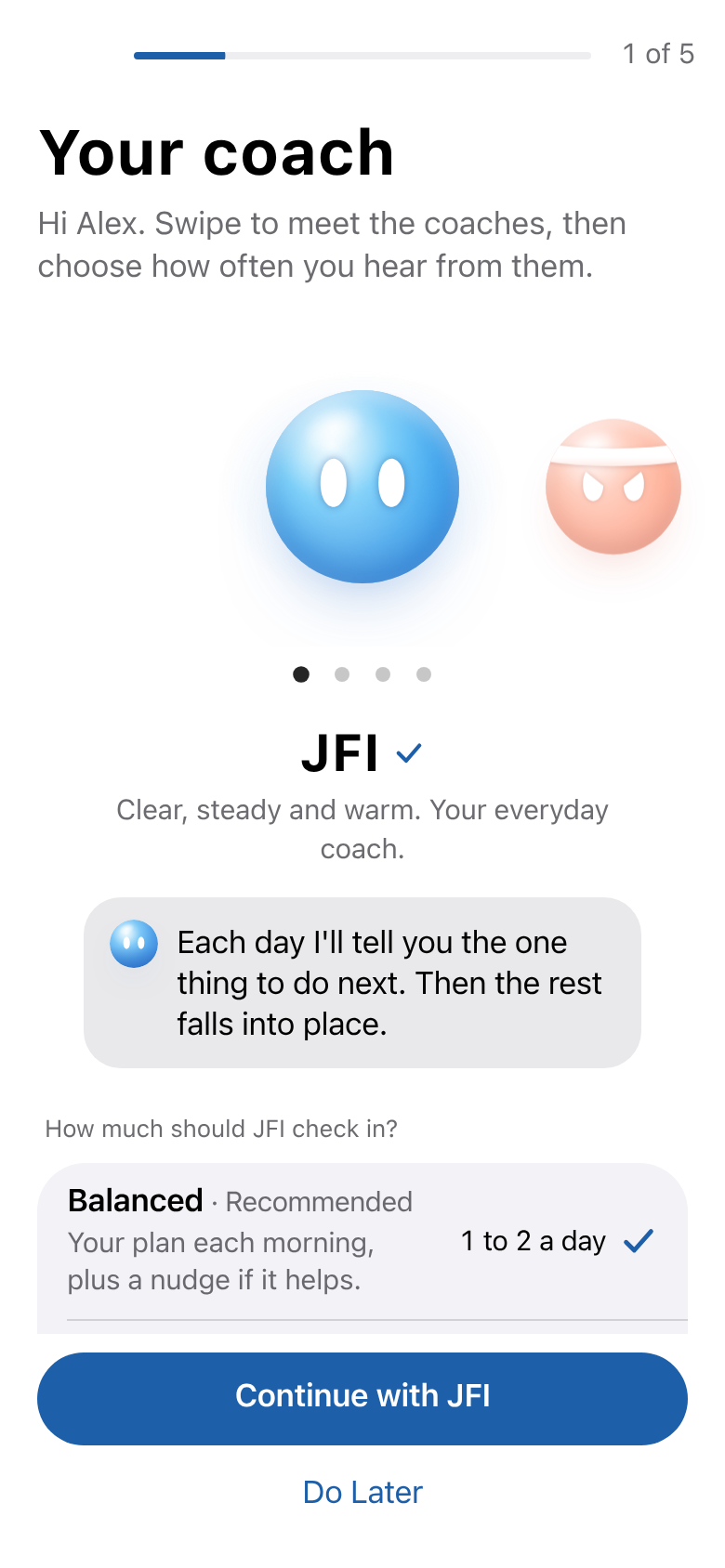
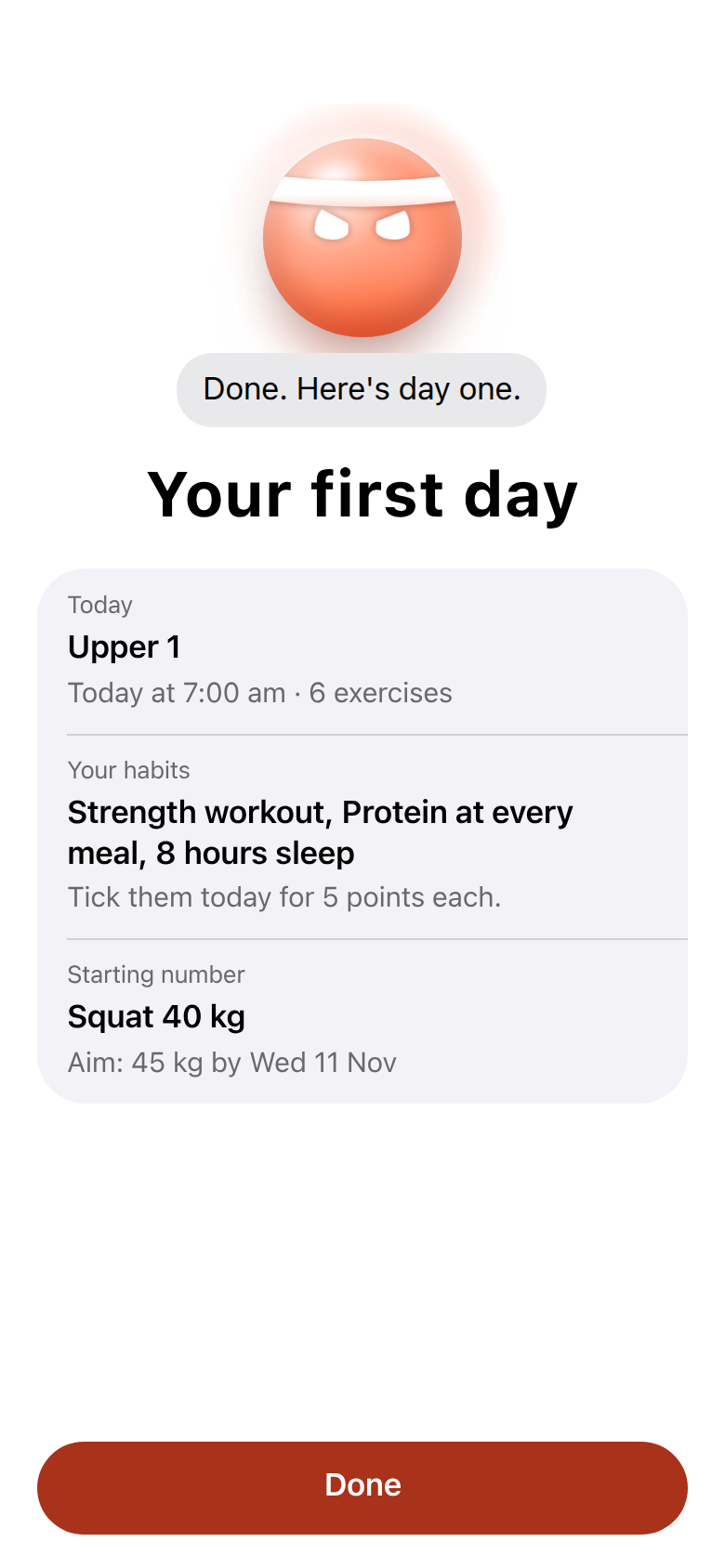
Steps 2 to 5 are goal, training, habits and injuries. Anything they skip keeps what they had, including their current program. People with notifications off get one screen asking to turn them on.
Before anything goes out on Thursday
- Your yes on the wording of each message on this page. Changes are easy until then.
- Everyone is on the new app. Tonight's "everyone to V2" switch has to be done and checked. Otherwise the push opens the old app for most clients.
- Push: sent once with the jf-push route and a fixed send key, to the audience you pick. The live sender is switched on (checked read-only tonight).
- Email: the list is built and checked against JF Coach sign-ins before sending, with a test to you first. It isn't built yet.
- Chat post: you post it yourself from your app at 12:00, or tell us to post it as you.
Sources: your 30 Sep 13:40 brain dump from the Gabrielle meeting, the drafts in round-0930b/COMMS-1OCT-DRAFTS.md, and the live app code (announcement sender, group chat push, invite email, setup flow).